Introduction
One often wonders how to keep a folding scooter both trackable and protected from the elements. This guide explains how to install an Apple AirTag on a folding scooter without compromising the scooter's waterproofing. The reader will learn which tools are necessary, how to prepare the scooter frame, and how to seal the attachment so that rain, splashes, or accidental submersion do not damage the AirTag or the scooter. By following the steps, one can enjoy peace of mind knowing that a valuable asset can be located quickly while the scooter remains fully functional in wet conditions.
What You'll Need
- A Belkin Secure AirTag Key Ring Holder – durable, scratch‑resistant case with raised edges ($12.99, 4.7/5 rating, 36,320 reviews).
- Water‑proof adhesive tape (e.g., 3M Scotch® Waterproof Tape).
- Silicone sealant suitable for metal and plastic surfaces.
- Small Phillips‑head screwdriver.
- Cleaning cloth and isopropyl alcohol.
- Optional: small zip‑lock bag for temporary protection.
Step 1: Assess the Scooter Frame
Before attaching any device, one should examine the scooter for existing waterproof seals. Identify the folding joint, the handle‑bar stem, and the deck where water ingress is most likely. Use a flashlight to locate any gaps or seams that already contain rubber gaskets. Understanding the scooter's construction helps to choose an attachment point that does not interfere with the original sealing mechanisms.
One should also verify that the selected location provides a flat surface for the AirTag holder. A smooth metal or reinforced plastic panel near the handle‑bar stem is ideal because it offers easy access for the user while remaining covered by the scooter's frame when folded.
Step 2: Clean and Prepare the Attachment Area
Using a cleaning cloth dampened with isopropyl alcohol, one must wipe the chosen surface to remove dust, grease, and residues. Allow the area to dry completely; a clean surface ensures that adhesive tape and sealant adhere properly. If the scooter has a protective coating, gently abrade a small 1‑cm square with fine‑grade sandpaper to improve bonding, being careful not to damage surrounding paint.
After cleaning, place a small zip‑lock bag over the area to keep it dry while gathering the remaining tools. This precaution prevents accidental moisture from reaching the site before sealing.
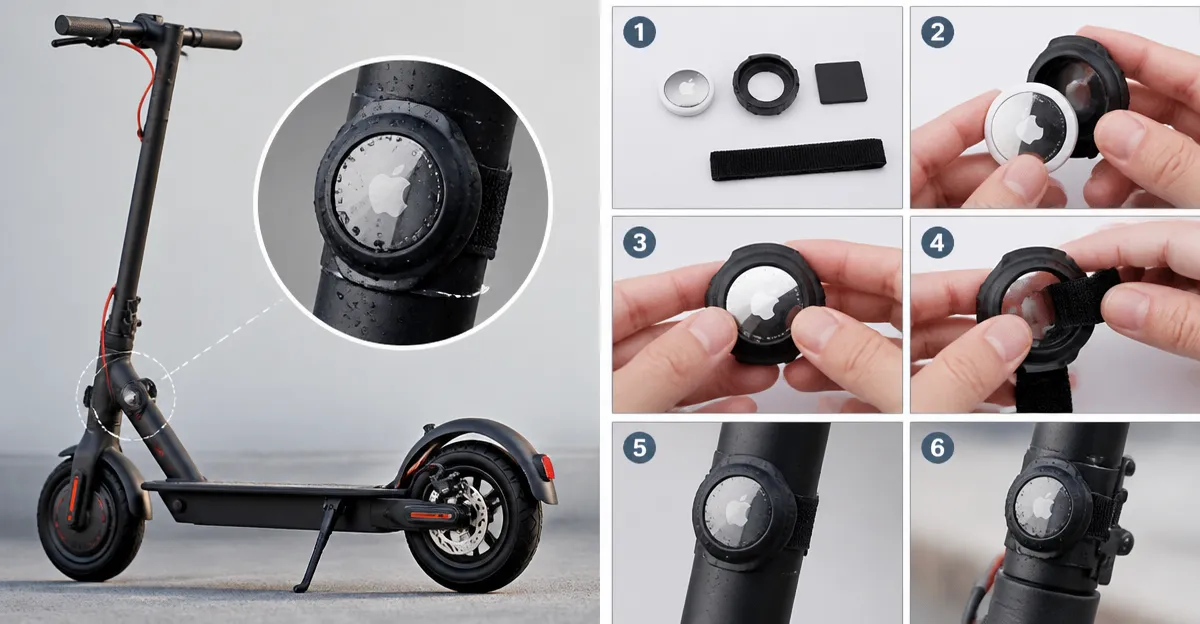
Step 3: Attach the Belkin Secure AirTag Key Ring Holder
The Belkin Secure AirTag Key Ring Holder is engineered with a twist‑and‑lock mechanism that secures the AirTag without requiring permanent modifications. Insert the AirTag into the holder, ensuring that the raised edges protect the device from scratches. The holder’s open face allows the AirTag's speaker to emit sound when located, while the key ring provides a sturdy attachment point.
Next, loop the key ring through a pre‑drilled or existing hole in the scooter frame. If no hole exists, use a 2‑mm drill bit to create a discreet opening, then immediately seal it with silicone sealant to maintain waterproofing. Tighten the ring so that it sits flush against the frame, preventing movement during rides.
This product is particularly useful because its durable plastic construction does not corrode, and its design keeps the AirTag visible for easy pairing. The $12.99 price point is modest compared with custom‑made mounts, and the 4.7‑star rating reflects broad user satisfaction.
Step 4: Seal the Connection for Waterproofing
Apply a strip of waterproof adhesive tape over the key ring and surrounding area. The tape should extend at least 1 cm beyond the edges of the holder to create a watertight barrier. Press firmly to eliminate air bubbles. For added protection, run a bead of silicone sealant along the outer perimeter of the tape. Smooth the sealant with a fingertip or a silicone tool, ensuring a continuous seal that adheres to both the scooter's surface and the tape.
Allow the silicone to cure for the manufacturer's recommended time, typically 24 hours, before exposing the scooter to moisture. During this period, keep the scooter in a dry environment to prevent premature sealing failure.
Step 5: Test the Installation
After the sealant has cured, one should verify that the AirTag remains functional. Use an iPhone to locate the AirTag via the Find My app, confirming that the sound emits and the signal is strong. Then, simulate exposure to water by gently sprinkling a damp cloth over the attachment point. Observe for any seepage; the tape and sealant should repel moisture effectively.
If the AirTag functions and no water penetrates, the installation is successful. One may now fold the scooter, ensuring that the holder does not interfere with the folding mechanism. The key ring should rotate freely without catching on any moving parts.
Tips & Pro Tips
- Choose a color of the Belkin holder that contrasts with the scooter frame for quick visual identification.
- When drilling a new hole, align it with existing structural ribs to avoid weakening the frame.
- Apply silicone sealant in thin layers; multiple thin coats cure more reliably than a single thick layer.
- Periodically inspect the tape and sealant for wear, especially after heavy rain or frequent folding.
- For added security, wrap a second layer of waterproof tape over the first, creating a double‑seal system.
Troubleshooting
Problem: AirTag signal is weak after installation.
Solution: Ensure that the holder is not positioned behind metal components that can block Bluetooth signals. Relocate the holder to a more exposed area if necessary.
Problem: Water appears under the seal after a rainstorm.
Solution: Remove the tape, clean the surface, and reapply a fresh strip of tape with a new bead of silicone. Verify that the tape is pressed without gaps.
Conclusion
One now possesses a reliable method to attach an Apple AirTag to a folding scooter while preserving the scooter's waterproof integrity. By selecting the Belkin Secure AirTag Key Ring Holder, preparing the surface, sealing the connection, and testing the result, the user gains continuous location tracking without compromising durability. The steps outlined in this guide are applicable to a wide range of folding scooters and can be adapted for other waterproof accessories.
Products Mentioned in This Guide
Frequently Asked Questions
How can I attach an AirTag to a folding scooter without damaging its waterproof seal?
Use a waterproof case like the Belkin Secure AirTag holder, secure it with waterproof adhesive tape, and seal the edges with silicone sealant.
What tools are required for a waterproof AirTag installation on a scooter?
You’ll need a Phillips‑head screwdriver, waterproof adhesive tape, silicone sealant, cleaning cloth, isopropyl alcohol, and the AirTag holder.
Will the AirTag still work if it gets briefly exposed to rain?
Yes, as long as the holder is sealed with tape and silicone, brief rain exposure won’t affect the AirTag’s functionality.
Can I remove the AirTag later without harming the scooter’s frame?
Yes, gently cut the tape and peel the silicone sealant; the scooter’s frame remains unharmed if you avoid excessive force.
Is a zip‑lock bag necessary for protecting the AirTag during installation?
It’s optional—use a zip‑lock bag only for temporary protection while the sealant cures, not as a permanent solution.